Know how your battery is ageing.
Headroom reads your MacBook's battery the way macOS does: maximum capacity, charge cycles, what is charging it now and a week of charge history.
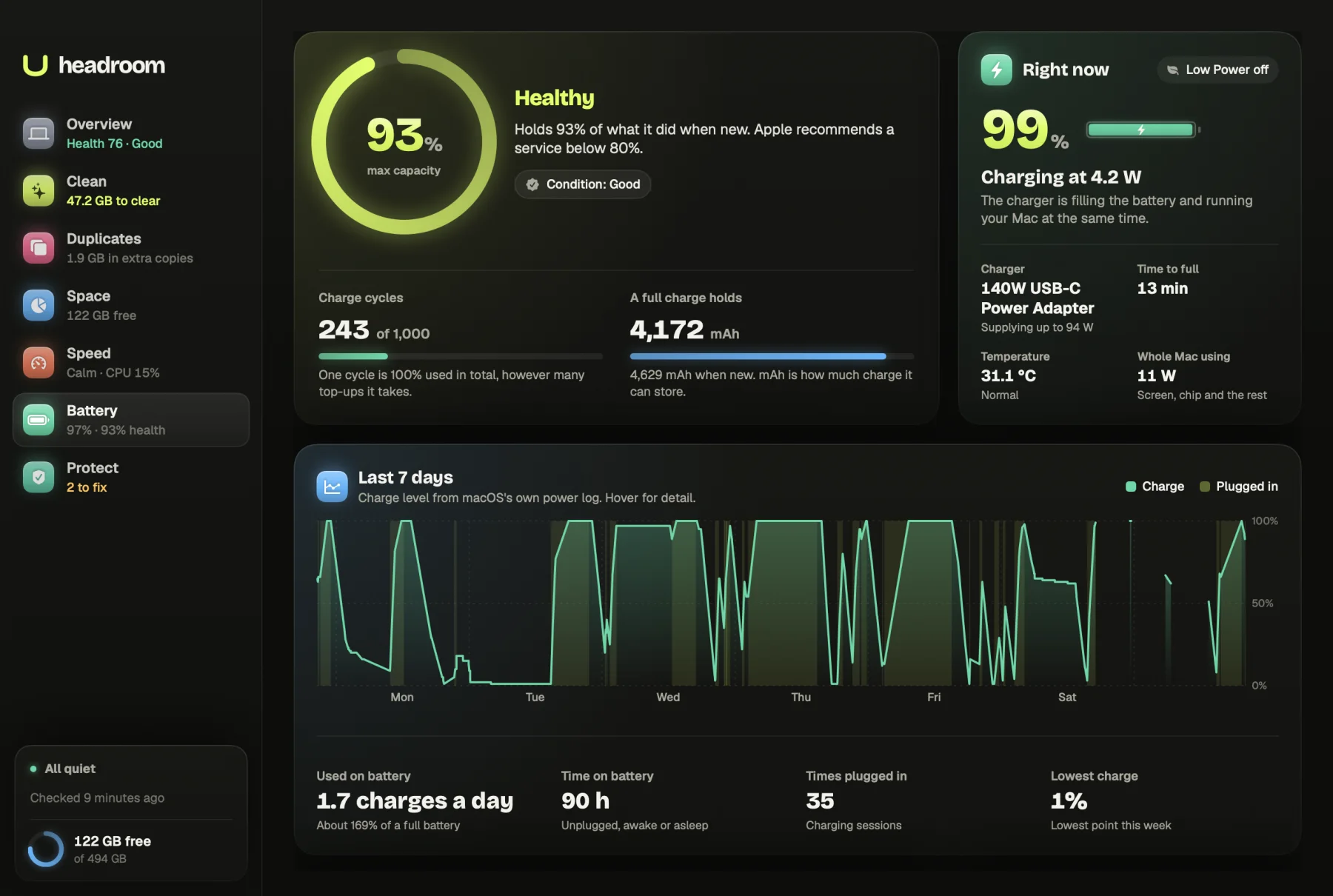
A MacBook battery wears a little with every charge, and the signs are easy to miss until it suddenly lasts half a day. Headroom is a Mac battery health app that reads the same figures macOS keeps about your battery and lays them out in one screen: how much it holds compared with new, how many cycles it has done, what is charging it now and how you have used it over the past week.
What it shows you
Health
The main panel is a ring showing max capacity: how much charge the battery holds now, as a percentage of what it held when new. Next to it is a verdict in one word, with a line saying what it means:
- Healthy when it holds 80% or more.
- Worn below 80%.
- Service recommended when macOS itself says the battery is due a service.
- Needs a service when the battery has reported a fault.
Underneath are Charge cycles, shown against the battery's rating, and A full charge holds, the capacity in mAh beside its size when new. One cycle means 100% used in total, however many top-ups that takes.
Right now
The next panel says what is happening this minute: charging and at how many watts, plugged in and full, or running on battery and drawing how much power. It names the charger and the most it can supply, estimates Time to full or Time left, and shows the battery's temperature with a plain word: Normal, Warm, Hot or Cold.
Last 7 days
A chart shows the charge level across the past week, with the time spent plugged in shaded. Four figures sit below it: Used on battery, as an average a day, Time on battery, Times plugged in, and Lowest charge. Hover over the chart for the exact level at any point.
Using energy now and tips
Using energy now lists the apps and background tasks draining the battery, scored with Apple's energy impact figure. Helper processes count towards their app, and common macOS tasks get plain names, such as Spotlight indexing files or Time Machine backing up.
Tips for this battery only appear when your readings support them. If your MacBook often sits at 100% on the charger, it points you to Optimised Battery Charging. If the battery ran very low this week, or a small charger is slowing charging, it says so. When nothing applies, it says there is nothing to change.
How it works
Headroom asks macOS rather than guessing. Live readings come from the battery's own controller, and Apple's maximum capacity figure and condition come from the system report. The charge history comes from macOS's power log, which records each time the Mac switches between charger and battery along with the charge level. Gaps of more than six hours in the log are treated as the Mac being off and left out of the totals.
Readings vary by Mac model. If a figure is missing, Headroom shows "Not reported" rather than inventing one. If it has to work out maximum capacity from the raw charge figures, it says so on the screen. Energy use comes from a short sample of what each process is doing, the same energy impact measure macOS uses elsewhere.
Our guide to checking Mac battery health shows where the same figures live in System Settings and Terminal, and what they mean for replacement. If the battery drains because something is busy in the background, the performance monitor shows which app is keeping the processor working, and why a Mac runs slow walks through the causes.
What is free and what the licence does
The Battery screen is free in full: health, cycles, the live panel, the week of history, energy use and tips. There is nothing to buy here. The $19 licence covers the fixes on other screens: cleaning, removing duplicates, moving large files to the Bin, fixing risky startup scripts and turning off startup items. It is one payment, with no subscription, for up to three Macs, with a full refund within 30 days through Polar.
How it keeps your Mac safe
The Battery screen only reads. It changes no power settings and does not try to manage charging. Where a tip involves a setting, it tells you where to find it in System Settings, and the choice stays yours.
Nothing about your battery or your habits leaves your Mac. The only network request Headroom makes checks your licence key.
Who it is for
MacBook owners wondering whether a battery service is due, and wanting the real figure before booking one. Anyone buying or selling a second-hand MacBook who wants an honest reading of the battery. People who work unplugged and want to know what drains it fastest. And anyone who leaves their MacBook on the charger all day and wonders whether that matters.
Check your battery now
Download Headroom and open the Battery tab. It is free, and the week of history appears once macOS hands over its power log, which can take a minute or two. If you also want to clear space or tidy startup items, the licence is $19 once. Headroom runs on Apple Silicon Macs with macOS 14 or later.
Questions
Where does Headroom get the battery health figure?
From macOS. Maximum capacity and the battery's condition come from the same system report that System Information shows. If macOS gives no figure, Headroom works one out from the battery's own charge readings and says so.
What counts as a healthy battery?
Headroom calls a battery Healthy when it holds 80% or more of its original capacity, and Worn below that. If macOS itself says the battery needs a service, Headroom shows Service recommended whatever the percentage.
How many charge cycles is a MacBook battery rated for?
Headroom shows the rating the battery reports. When the battery does not report one, it uses 1,000, Apple's rating for modern MacBooks, and says that is where the figure comes from.
Why is my charge history short?
It comes from macOS's power log, which keeps about a week. With less than that to read, Headroom shows what there is and says the figures are rough.
Does the battery screen work on a Mac mini or iMac?
Those Macs have no battery, so Headroom says so and shows what is using energy right now instead.
Is the battery health app free?
Yes. Everything on the Battery screen is free. The $19 licence only covers the fixes on other screens, such as cleaning and removing duplicates.