See exactly where your space went.
Headroom maps your whole disk as blocks sized by the space they take, so the biggest folders are obvious at a glance. Looking never deletes anything.
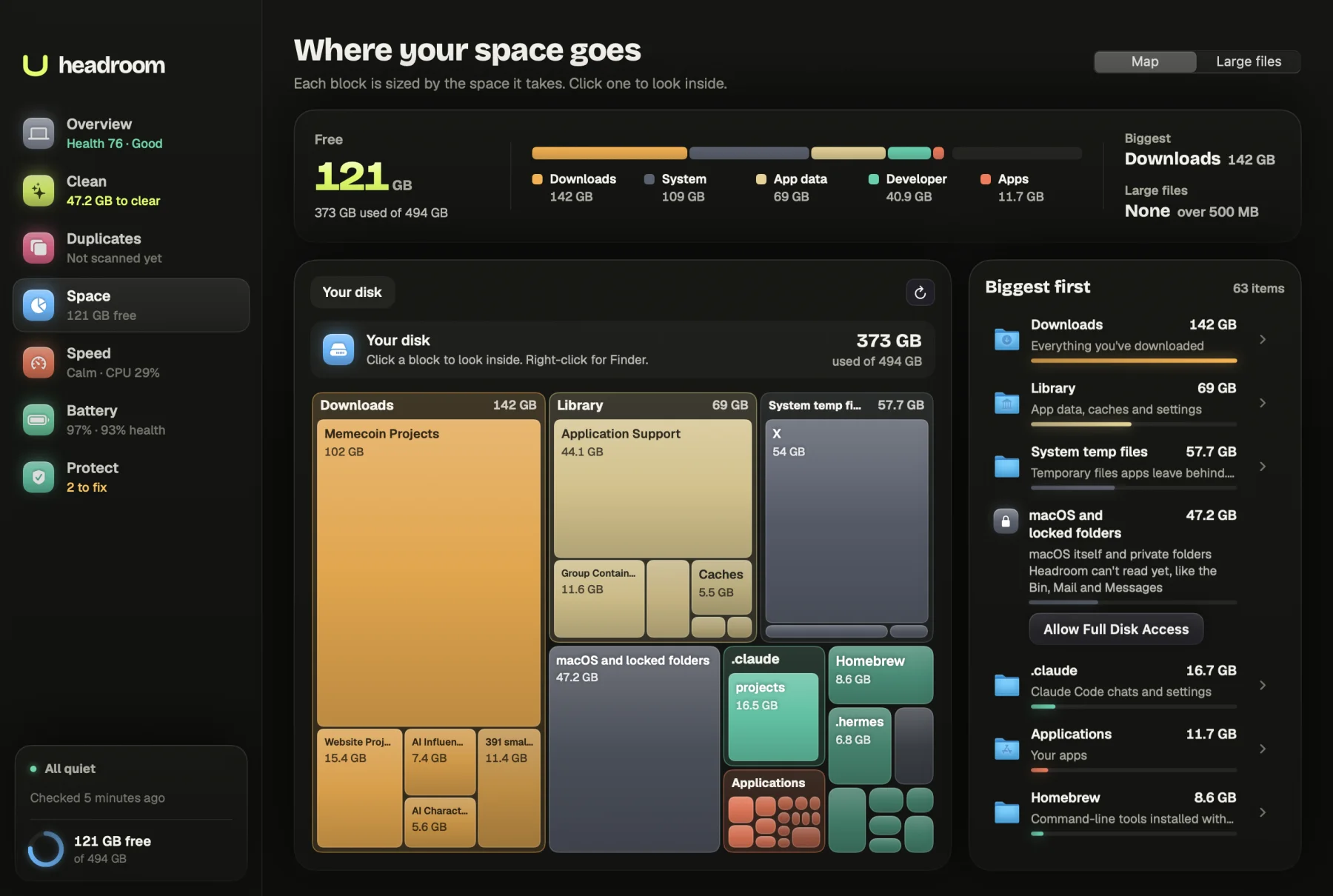
When a Mac says its disk is almost full, the first question is where the space went. Whether you call it a disk space analyser or analyzer, the job is the same: measure everything and show it by size. Headroom does that with a map of your whole disk, where every block is sized by the space it takes, and a list of your largest files with the date you last opened each one.
What it shows you
Open the Space tab, headed Where your space goes. At the top is your free space and how much of the disk is used. A switch moves between Map and Large files.
The map
The first level shows everything in your home folder, plus Applications, Homebrew if you have it, system temp files and shared temp files. One more block, macOS and locked folders, covers used space that no folder Headroom can measure accounts for. That is macOS itself, system files, and private folders macOS keeps from apps.
Each block is coloured by what it holds: Apps, Documents, Downloads, Media, Developer, App data, System or Other. Click a block to look inside. The map shows two levels at once, so you see a folder and its biggest contents together. Apps and other bundles count as one block, since you would never remove half an app.
Beside the map, a Biggest first list names each item with a short note, such as "App data, caches and settings" for Library, "iCloud Drive files kept on this Mac" for Mobile Documents, or "Installed packages. Rebuilds with npm install" for a node_modules folder. Any folder or file in the list can be shown in Finder.
Large files
The Large files view lists files over 100 MB, 500 MB or 1 GB in Downloads, Desktop, Documents, Movies, Music and Pictures, biggest first. Each one is labelled Video, Disk image or installer, Archive, App data or Other, with a line such as "opened yesterday", "not opened in a year", or "saved a year ago, no record of opening it". That date usually decides whether a file can go.
How it works
Headroom measures folders with du, the disk usage tool built into macOS, one level at a time. Sizes are the space each item takes on disk, in the same decimal units Finder uses. It stays on your startup disk and skips symbolic links, so nothing is counted twice.
Some folders are private on macOS. Without Full Disk Access, Headroom cannot read Mail, Messages, Safari or the Bin. Instead of guessing, it counts them as zero and tells you: "1 folder here is locked", with an Allow Full Disk Access button that opens the right System Settings pane. Allowing access only lets Headroom measure those folders. It still never changes them.
The Large files view skips your Photos library, apps, code packages, git data, Library folders and hidden folders. Those belong to apps rather than to you, and moving them by hand can break things. The last opened date comes from Spotlight, the same record Finder shows in its Last opened column.
If most of your space sits in the macOS block, our guide to System Data on a Mac explains what macOS counts there. For the manual way to hunt down big files, see how to find large files on a Mac. Developers who find a very large Containers folder inside Library may want the guide to Docker Desktop disk space.
What is free and what the licence does
The map and the Large files view are free, with no limit on how far you look. The $19 licence turns on Move to Bin in the Large files view, so you can tick several files and clear them in one go. It is one payment, with no subscription, for up to three Macs. Polar handles payment and offers a full refund within 30 days.
How it keeps your files safe
The map is read-only. Clicking, opening and showing in Finder never changes anything.
Moving large files is always your choice. You tick the files, and a confirm sheet shows the total and each file before you press Move to Bin. Headroom checks each file again first: that it is still there, and that it is not in a protected place such as your Photos library, Mail, Messages or iCloud Drive. Files go to the Bin, so you can put them back.
Afterwards Headroom measures free space on the disk and reports it honestly. If the figure has not changed, it says why: files in the Bin keep their space until you empty it in Finder. Your files never leave your Mac, and the only network request Headroom makes checks your licence key.
Who it is for
Anyone whose Mac warns that the disk is nearly full, and who wants to see the cause before deleting anything. Video editors and photographers with large media folders. People who keep years of downloads. Developers whose space disappears into toolchains, Homebrew, package caches and virtual machine images.
The map tells you where the space is. To clear the parts that rebuild by themselves, such as caches and old build folders, use Headroom's cleaner.
Map your disk now
Download Headroom and open the Space tab. The map is free, and so is the Large files list. When you want to clear files from inside Headroom, the licence is $19 once. Headroom runs on Apple Silicon Macs with macOS 14 or later.
Questions
What does a disk space analyser do?
It measures every folder on your disk and shows them by size, so you can see what is taking the space instead of guessing. Headroom draws it as a map of blocks with a list beside it, biggest first.
What is the block called macOS and locked folders?
It is used space that no measured folder accounts for: macOS itself, system files, and private folders such as Mail and Messages that macOS keeps from apps until you allow Full Disk Access.
Does Headroom need Full Disk Access?
No, but without it Mail, Messages, Safari and the Bin count as zero on the map. Allowing it lets Headroom measure them. It still never changes them.
How does Headroom know when I last opened a file?
It reads the last opened date that Spotlight keeps, the same date Finder shows. When macOS has no record, Headroom says so and shows when the file was saved instead.
Is the disk map free?
Yes. The map and the Large files list are both free. Moving large files to the Bin from Headroom needs the $19 one-time licence.