Clear the clutter. Keep what matters.
Headroom finds the caches, build folders and leftovers that quietly fill a Mac, tells you what each one is, and clears only what you tick.
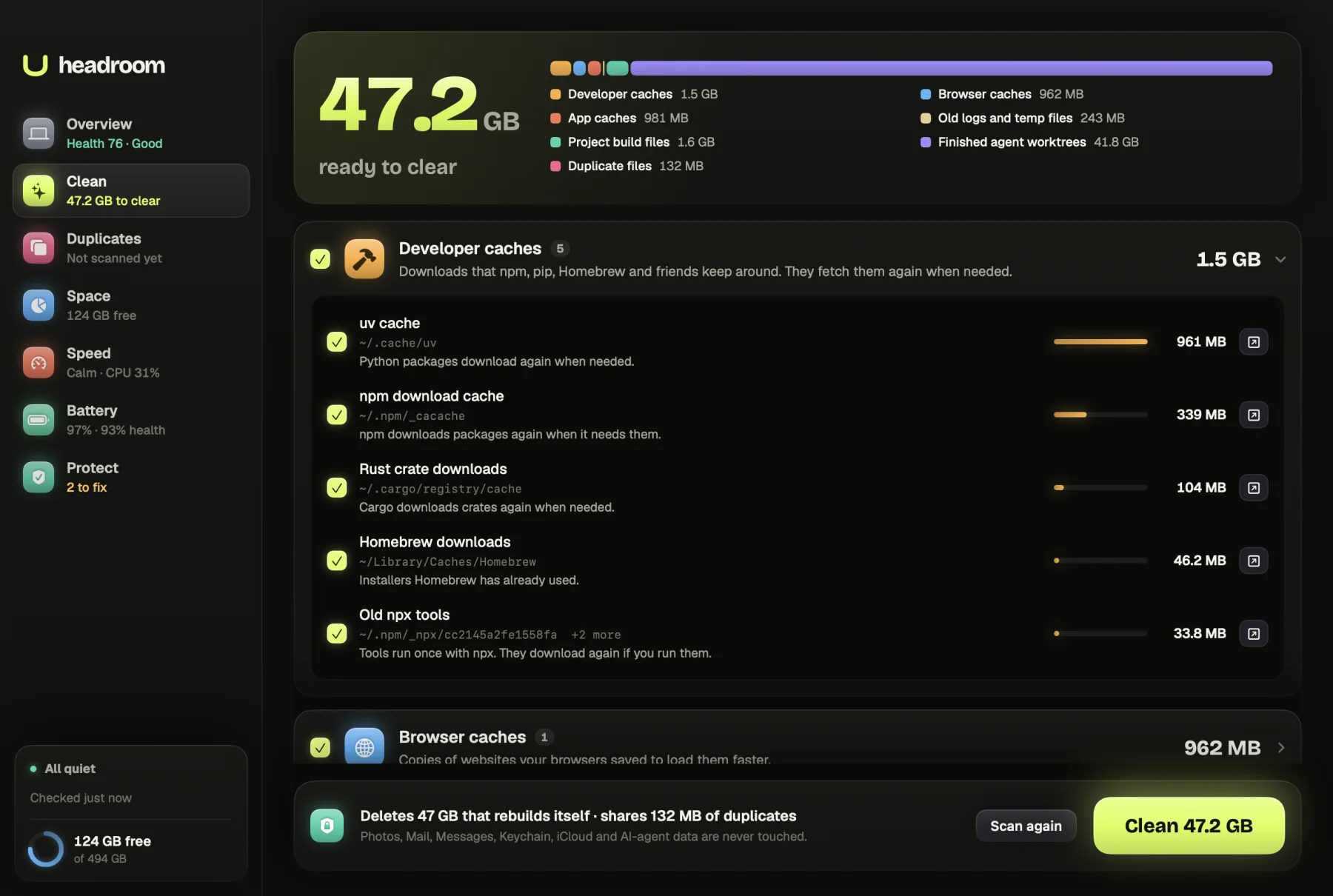
Most of what fills a Mac is not your work. It is copies of things: package downloads, browser caches, build output, logs and installers you used once. Headroom is a Mac cleaner app built around one rule. It only ticks what rebuilds itself or loses nothing, it explains every item in plain words, and nothing changes until you confirm.
What the cleaner shows you
Open the Clean tab and press Scan my Mac. Headroom reads nine places where Macs fill up: Developer caches, Browser caches, App caches, Old logs and temp files, Project build files, Finished agent worktrees, Duplicate files, Large files you haven't opened, and Old installers and the Bin. The scan only reads. Nothing moves while it runs.
The result is one large figure, ready to clear, with a bar showing which groups it comes from. Each group lists its items biggest first. Every item shows its size, its path and a short note on what happens when it goes, such as "Pages load a little slower the first time. Logins, history and bookmarks stay." A button beside each one shows it in Finder, so you can check for yourself.
Personal files sit apart, under Your call: files over 500 MB that you have not opened for three months, disk images and installer packages in Downloads, and the Bin. They are shown so you can decide. None of them is ticked for you.
How it works
Caches that download again
Headroom looks for the caches developer tools keep: npm, pip, uv, Homebrew, pnpm, Bun, Yarn, CocoaPods, Gradle, Cargo and Go, plus Xcode build files, iOS Simulator caches and Puppeteer browsers. It also finds npx tools you have not run for a week, and older Playwright browsers while keeping the newest of each. The guide to clearing Xcode DerivedData explains what those folders hold.
Browser caches are covered for Chrome, Brave, Edge, Arc, Vivaldi, Chromium, Opera and Firefox. App caches are covered for Spotify, Discord, Slack, VS Code, Cursor and Zoom, and only while the app is closed. If Slack is open, the item says "Quit Slack first" and stays unticked. Our guide to clearing cache on a Mac covers the manual route.
Build folders and worktrees
Headroom walks your usual code folders, such as Developer, Projects, Code, GitHub, Documents and Desktop. A node_modules folder is only offered when it sits next to a package.json, and a Rust target folder only next to a Cargo.toml. Both are only offered when nothing in the project has been edited for two weeks. Framework output such as .next, .nuxt, .svelte-kit, .turbo and .vite, and Python caches such as __pycache__, are offered as build files. Any project with a program running inside it is skipped. The node_modules guide shows how to rebuild each one.
Coding agents often leave spare copies of a project behind as git worktrees. Headroom only offers one when it has nothing unsaved, every commit is already on the main checkout's branch, nothing has touched it for 12 hours and no program is working inside it. It removes it with git worktree remove, so the branch stays.
Logs, temp files and installers
App and crash logs older than two weeks, and temp files older than a week, are offered as safe to clear. Disk images and installer packages in Downloads older than a week appear under Your call, unticked.
Free to scan, $19 to clean
The download is free, and so is every scan. You see the full list, every size and every note without paying. The $19 licence turns on the Clean button. It is one payment, with no subscription, and one key works on up to three Macs. Payment goes through Polar, and you can ask for a full refund within 30 days.
How it keeps your files safe
Pressing Clean opens a sheet headed Here's exactly what happens. It splits your selection three ways: Deleted for good for caches, build files and finished worktrees, Shared, nothing removed for duplicates, and Moved to the Bin for anything personal you ticked.
Caches and build folders are deleted outright rather than moved to the Bin, because they rebuild and the Bin would only keep holding their space. Personal files always go to the Bin, so you can put them back. Duplicates become APFS clones: both files stay where they are and keep working, but their data is stored once. The duplicate finder goes further on this. Emptying the Bin is offered as its own item, labelled as permanent, and is never ticked.
Some places are off limits whatever a scan finds: your Photos library, Mail, Messages, Keychain, iCloud Drive and other cloud folders, Safari, Contacts, Calendars, your SSH keys and AI agent data. Headroom never removes a top-level folder such as Documents. Every path is checked against that list again right before it changes. When the clean finishes, the freed figure is measured on the disk before and after, not added up from estimates.
Your files never leave your Mac. The only network request Headroom makes checks your licence key.
Who it is for
Developers get the most back. Package caches, node_modules in old projects, Rust target folders, Xcode build files and leftover agent worktrees add up quickly, and all of them rebuild.
It also suits anyone whose Mac says the disk is nearly full and who wants to know what is safe to clear before anything goes. If you want to see the path of every item, and why it is safe, before you press a button, this is how Headroom works by default.
Clear space on your Mac today
Download Headroom and run the scan for free. You will see what can go, item by item, before you decide anything. When you are ready to clean, the licence is $19 once. Headroom runs on Apple Silicon Macs with macOS 14 or later.
Questions
Is it safe to use a Mac cleaner app?
It depends on what the app is allowed to touch. Headroom only ticks things that rebuild themselves or lose nothing, shows the path and the outcome of every item before you confirm, and refuses to touch Photos, Mail, Messages, Keychain or iCloud Drive at all.
Does Headroom delete files or move them to the Bin?
Both, and it tells you which before anything happens. Caches and build folders such as node_modules and target are deleted outright because they rebuild. Large old files and installers go to the Bin, and duplicates become space-sharing clones.
Will clearing caches break my apps?
Caches are copies apps keep to work faster, and they rebuild by themselves. Headroom only clears an app's cache while that app is closed, and clearing a browser cache keeps your logins, history and bookmarks.
Will it touch projects I am working on?
No. node_modules and Rust target folders are only offered from projects with no edits for two weeks, and any project with a program running inside it is skipped.
What does the free version of the cleaner do?
The free download runs the full scan and shows everything it found, with sizes, paths and notes. The $19 licence, paid once for up to three Macs, turns on the Clean button.